
 fdback.io
Embedded Widget
Embed a feedback widget directly in your application
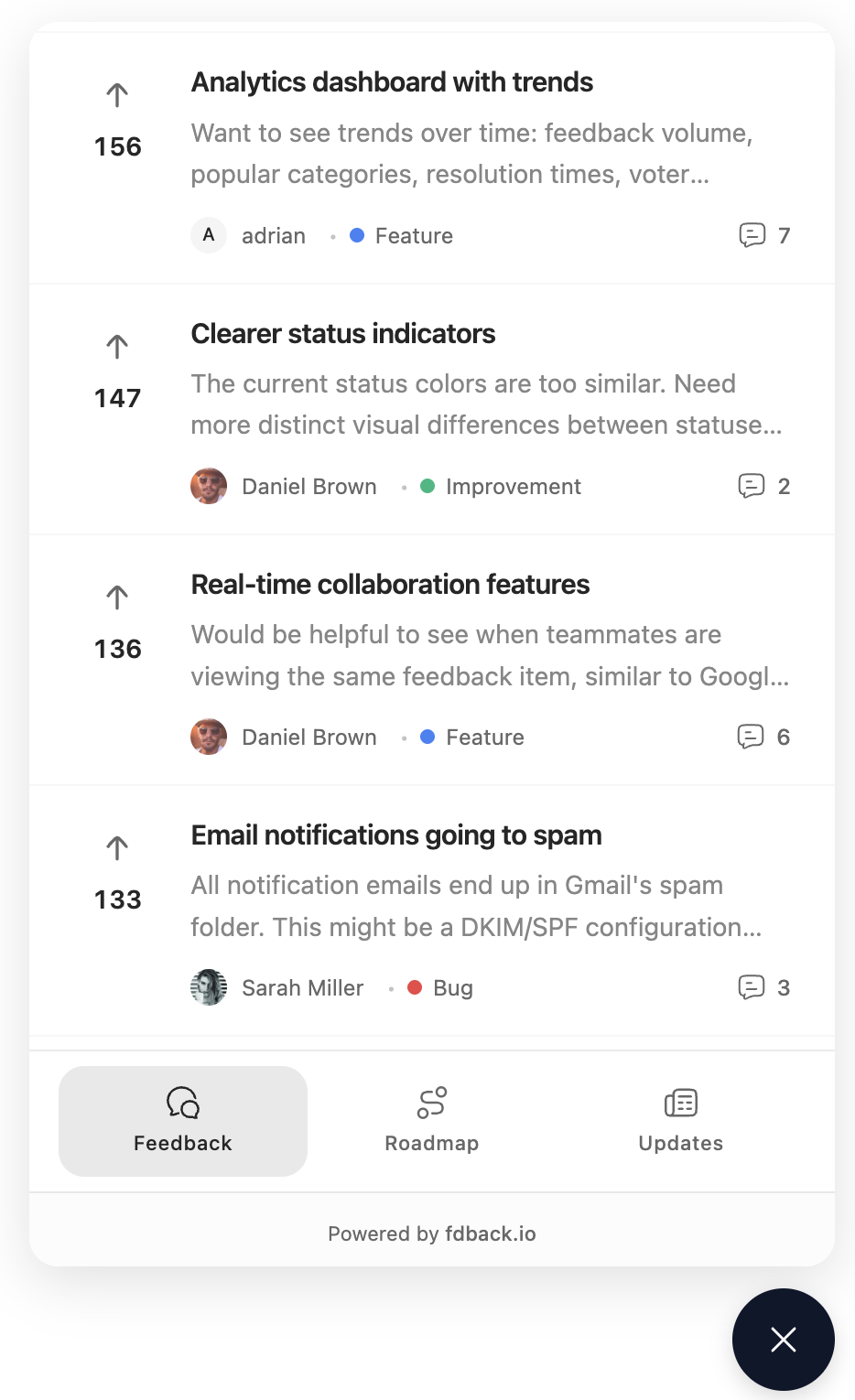
The embedded widget gives you a floating launcher button that opens an in-app panel (rendered in an iframe) for collecting feedback. It supports both anonymous and authenticated users.
Installation
Choose one:
# Bundlers (recommended)
npm install @fdback.io/sdk
# or
pnpm add @fdback.io/sdk
# or
yarn add @fdback.io/sdk
<!-- Script tag / CDN -->
<script src="https://unpkg.com/@fdback.io/sdk"></script>The script tag build exposes a global FdbackSDK. With a bundler you import widget from @fdback.io/sdk.
Quick Start (Anonymous)
Use this when you want anyone to post/vote without logging in (and your workspace settings allow it).
import { widget } from "@fdback.io/sdk";

widget.init({
  workspaceId: "your-workspace-id",
});
Or with a script tag:
<script src="https://unpkg.com/@fdback.io/sdk"></script>
<script>
  FdbackSDK.widget.init({ workspaceId: "your-workspace-id" });
</script>
Quick Start (Authenticated)
Set signEndpoint to a server endpoint that returns HMAC-signed user data.
import { widget } from "@fdback.io/sdk";

widget.init({
  workspaceId: "your-workspace-id",
  signEndpoint: "/api/fdback/sign",
  onAuthenticated: (user) => {
    console.log("User authenticated:", user.email);
  },
});
The widget calls your signEndpoint with POST + credentials: "include" (cookies). If the endpoint returns a non-200 status (not logged in), the widget continues in anonymous mode.
Creating a signEndpoint (Next.js)
If you’re on Next.js App Router, use the server-only helper:
// app/api/fdback/sign/route.ts
import { createSignHandler } from "@fdback.io/sdk/next";

export const POST = createSignHandler({
  workspaceId: process.env.FDBACK_WORKSPACE_ID!,
  workspaceSecret: process.env.FDBACK_WORKSPACE_SECRET!,
});
For auth-aware examples, see Next.js Integration.
Configuration
These are the widget options (TypeScript):
interface WidgetConfig {
  workspaceId: string;

  baseUrl?: string; // Default: "https://app.fdback.io"

  mode?: "simple" | "full"; // Default: "full"
  position?: "bottom-right" | "bottom-left" | "top-right" | "top-left";
  tabs?: ("feedback" | "roadmap" | "changelog" | "chat")[]; // Default: every available tab
  showBoardLink?: boolean; // Default: false
  primaryColor?: string; // Same as colors.primary, kept for backwards compatibility
  colors?: WidgetThemeColors;
  launcherIcon?: string; // Image URL, inline SVG, or HTML string
  theme?: "auto" | "dark" | "light"; // Default: "auto"
  width?: number; // Default: 440, Min: 320, Max: 600
  height?: number; // Default: 680, Min: 400, Max: 900

  signEndpoint?: string;
  user?: { email: string; name?: string };

  onOpen?: () => void;
  onClose?: () => void;
  onFeedbackSubmitted?: (feedback: { id: string }) => void;
  onTabChange?: (tab: string) => void;
  onAuthenticated?: (user: { id: string; email: string; name?: string | null }) => void;
  onUnreadChange?: (count: number) => void;
}

interface WidgetThemeColors extends WidgetThemeColorTokens {
  light?: WidgetThemeColorTokens;
  dark?: WidgetThemeColorTokens;
}

interface WidgetThemeColorTokens {
  primary?: string;
  primaryForeground?: string;
  background?: string;
  foreground?: string;
  card?: string;
  cardForeground?: string;
  popover?: string;
  popoverForeground?: string;
  muted?: string;
  mutedForeground?: string;
  accent?: string;
  accentForeground?: string;
  border?: string;
  input?: string;
  ring?: string;
}
Configuration Options
| Option | Type | Default | Description |
|---|---|---|---|
workspaceId | string | Required | Your workspace ID |
baseUrl | string | "https://app.fdback.io" | Widget iframe origin (useful for staging/self-hosting) |
mode | "simple" | "full" | "full" | simple shows only the feedback form; full enables tabs |
position | "bottom-right" | "bottom-left" | "top-right" | "top-left" | "bottom-right" | Launcher button position |
tabs | ("feedback" | "roadmap" | "changelog" | "chat")[] | All tabs | Tabs to show (only used when mode: "full"). chat appears only while your workspace has live chat on |
showBoardLink | boolean | false | Show an Open board link inside the widget |
primaryColor | string | - | Accent color, same as colors.primary |
colors | WidgetThemeColors | - | Custom widget color tokens |
launcherIcon | string | - | Custom launcher icon: image URL, inline SVG, or HTML string |
theme | "auto" | "dark" | "light" | "auto" | Widget color theme |
locale | string | "en" | Widget UI language ("en", "de", "fr"). Pass your user's language; region subtags like de-AT fall back to the base language, unsupported values fall back to English |
width | number | 440 | Widget width in pixels (min: 320, max: 600) |
height | number | 680 | Widget height in pixels (min: 400, max: 900) |
signEndpoint | string | - | Your server endpoint for authentication (HMAC-signed) |
user | { email: string; name?: string } | - | Optional user info (does not authenticate users) |
onOpen | () => void | - | Called when the widget opens |
onClose | () => void | - | Called when the widget closes |
onFeedbackSubmitted | (feedback: { id: string }) => void | - | Called after a feedback post is created |
onTabChange | (tab: string) => void | - | Called when the active tab changes |
onAuthenticated | (user) => void | - | Called after the widget logs a user in via signEndpoint |
onUnreadChange | (count: number) => void | - | Called when the number of chats with an unread reply changes |
Widget Methods
widget.init() returns an instance for programmatic control:
import { widget } from "@fdback.io/sdk";

const instance = widget.init(config);

// Control
instance.open();                  // Open the widget panel
instance.close();                 // Close the widget panel
instance.toggle();                // Toggle open/closed state
instance.destroy();               // Remove widget from page

// State
instance.isOpen;                  // boolean - current state
instance.unreadCount;             // number - chats with an unread reply

// Navigation (full mode only)
instance.setTab("roadmap");       // Switch to a specific tab ("chat" opens live chat)

// User management
instance.setUser({ email: "...", name: "..." });
The widget automatically closes when clicking outside of it or clicking the launcher button again.
Authentication Flow
When signEndpoint is configured, the widget authenticates users automatically:
┌─────────────────────────────────────────────────────────────┐
│  YOUR APP (acme.com)                                        │
│  1. widget.init({ signEndpoint: '/api/fdback/sign' })       │
│  2. SDK calls signEndpoint with cookies (for session)       │
│  3. Your server returns HMAC-signed user data               │
└────────────────────────┬────────────────────────────────────┘
                         │ Signed data via postMessage
                         ▼
┌─────────────────────────────────────────────────────────────┐
│  FDBACK WIDGET IFRAME (app.fdback.io)                       │
│  4. Validates HMAC signature with workspace secret          │
│  5. Creates/updates user, sets session cookie               │
│  6. User is authenticated - feedback attributed to them     │
└─────────────────────────────────────────────────────────────┘
Widget Modes
The examples below use the bundler API (import { widget } from "@fdback.io/sdk"). If you're using the script tag build, replace widget with FdbackSDK.widget.
Full Mode (Default)
Shows tabs for Feedback, Roadmap, and Changelog, plus Chat while your workspace has live chat on:
// Assumes: import { widget } from "@fdback.io/sdk";
widget.init({
  workspaceId: "your-workspace-id",
  mode: "full",
  tabs: ["feedback", "roadmap", "changelog", "chat"],
});
Leave tabs out to show every available tab. Chat then appears on its own as soon as you turn live chat on.
You can customize which tabs are shown:
// Assumes: import { widget } from "@fdback.io/sdk";
widget.init({
  workspaceId: "your-workspace-id",
  mode: "full",
  tabs: ["feedback", "roadmap"], // Hide changelog
});
Chat Only
Use the widget just for live chat: the launcher opens straight into the conversation with your team or your AI agent, with no tab bar.
// Assumes: import { widget } from "@fdback.io/sdk";
widget.init({
  workspaceId: "your-workspace-id",
  tabs: ["chat"],
});
Chat only shows while your workspace has live chat on. With it off, a chat-only widget shows the Feedback tab instead.
Simple Mode
Shows only the feedback form (no tabs) — ideal for focused feedback collection:
// Assumes: import { widget } from "@fdback.io/sdk";
widget.init({
  workspaceId: "your-workspace-id",
  mode: "simple",
});
Tab Views
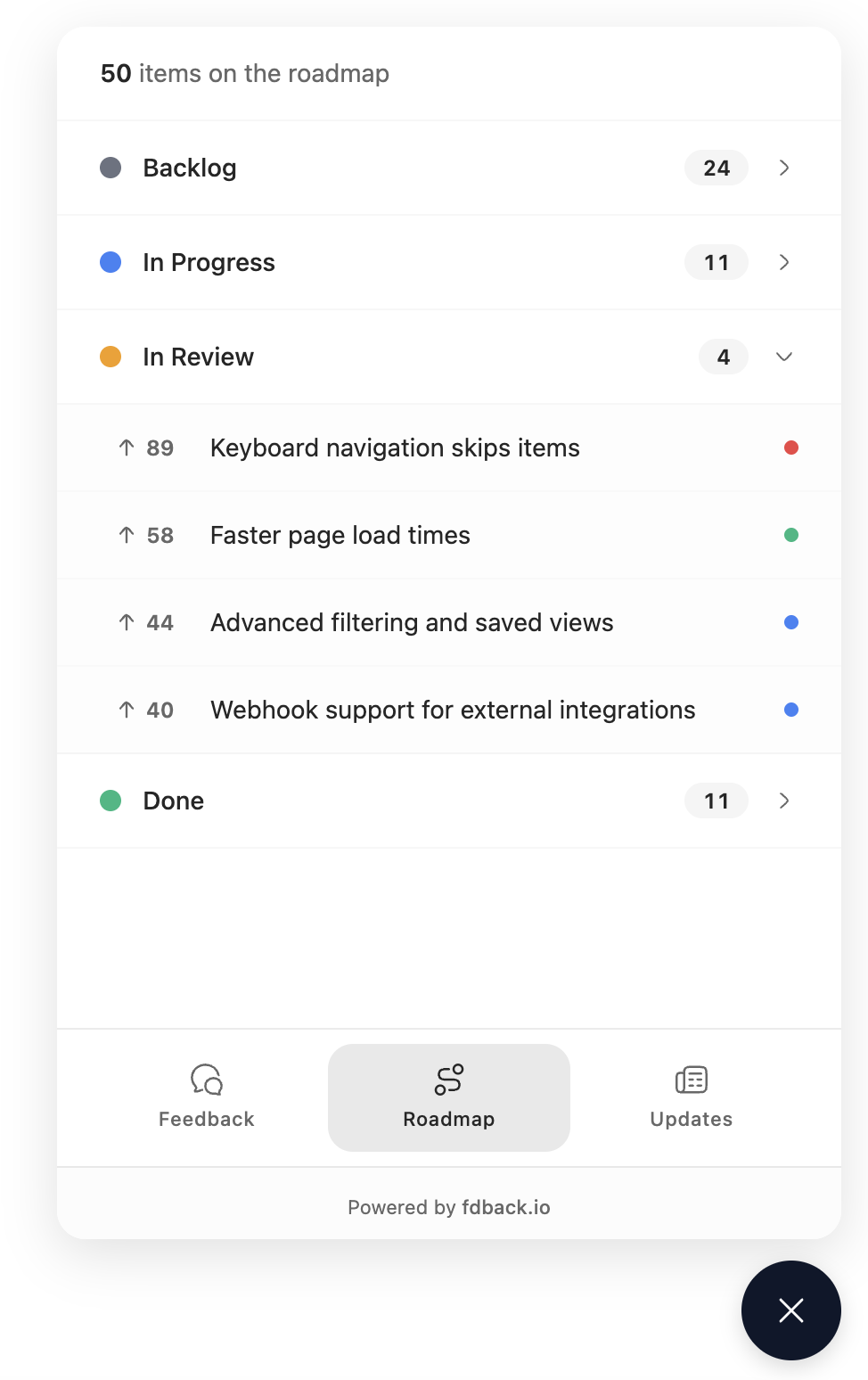
Roadmap Tab - Shows your product roadmap with status columns:
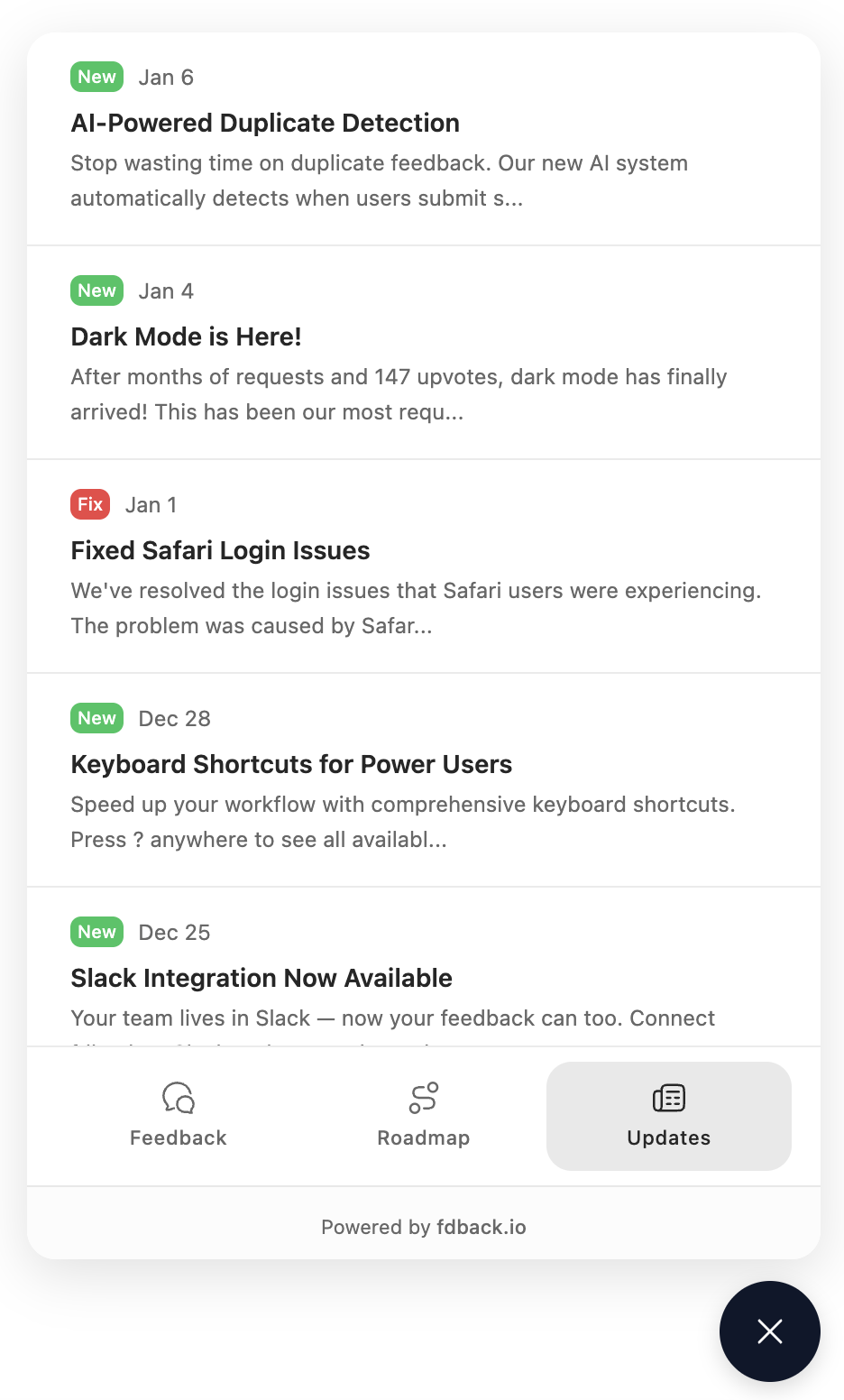
Changelog Tab - Displays product updates and announcements:
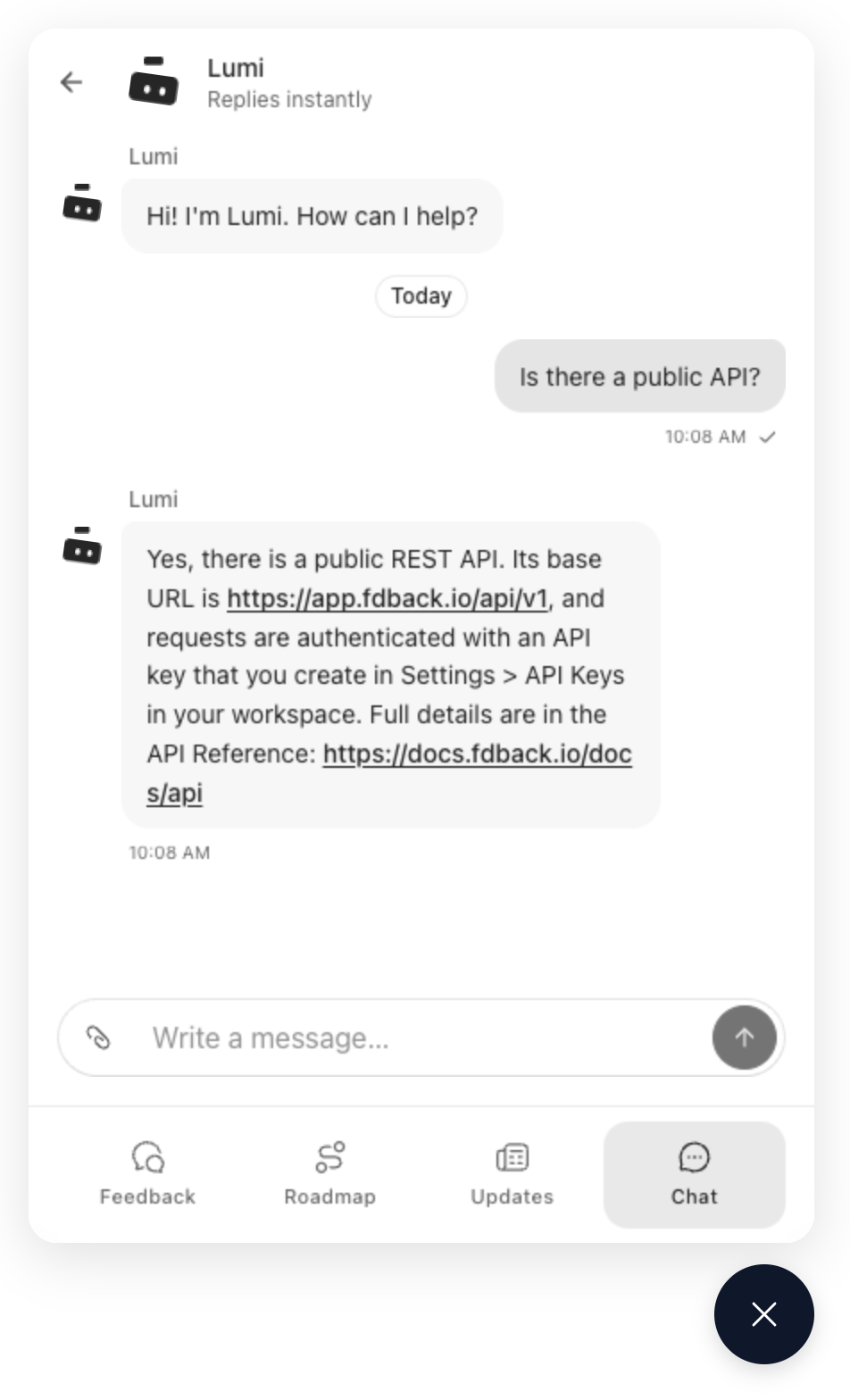
Chat Tab - Live chat with your team and your AI agent. Visitors signed in through signEndpoint keep their history across devices; anonymous visitors are remembered in their browser:
Event Callbacks
onOpen / onClose
// Assumes: import { widget } from "@fdback.io/sdk";
widget.init({
  workspaceId: "your-workspace-id",
  onOpen: () => {
    console.log("Widget opened");
    // Track analytics event
  },
  onClose: () => {
    console.log("Widget closed");
  },
});
onFeedbackSubmitted
// Assumes: import { widget } from "@fdback.io/sdk";
widget.init({
  workspaceId: "your-workspace-id",
  onFeedbackSubmitted: (feedback) => {
    console.log("Feedback submitted:", feedback.id);
    // Show thank you message, track conversion, etc.
  },
});
onAuthenticated
Called when a user is successfully authenticated via signEndpoint:
// Assumes: import { widget } from "@fdback.io/sdk";
widget.init({
  workspaceId: "your-workspace-id",
  signEndpoint: "/api/fdback/sign",
  onAuthenticated: (user) => {
    console.log("User authenticated:", user.email);
    // Update UI to show user is logged in
  },
});
onTabChange
Called when the user switches tabs (full mode only):
// Assumes: import { widget } from "@fdback.io/sdk";
widget.init({
  workspaceId: "your-workspace-id",
  mode: "full",
  onTabChange: (tab) => {
    console.log("Switched to tab:", tab);
    // Track which tabs users visit
  },
});
onUnreadChange
Called when the number of chats with an unread reply (from your team or your AI agent) changes. The default launcher already shows a red dot for it, even when the reply arrives while the widget is closed or after the visitor comes back later. Use the callback to badge your own button:
// Assumes: import { widget } from "@fdback.io/sdk";
const instance = widget.init({
  workspaceId: "your-workspace-id",
  onUnreadChange: (count) => {
    supportButton.dataset.unread = count > 0 ? String(count) : "";
  },
});

instance.unreadCount; // the current count, any time
For visitors with a chat still going, the SDK loads the widget hidden on page load so it can check for replies. Everyone else only loads it on first open.
Common Patterns
Open a specific tab from your own button
import { widget } from "@fdback.io/sdk";

widget.init({ workspaceId: "your-workspace-id" });

document.getElementById("open-roadmap")?.addEventListener("click", () => {
  widget.open();
  widget.setTab("roadmap");
});
Open the chat from your own button
import { widget } from "@fdback.io/sdk";

widget.init({ workspaceId: "your-workspace-id" });

document.getElementById("contact-support")?.addEventListener("click", () => {
  widget.open();
  widget.setTab("chat");
});
Update the user after login
import { widget } from "@fdback.io/sdk";

widget.init({ workspaceId: "your-workspace-id" });

// later (after your app logs a user in)
widget.setUser({ email: "user@example.com", name: "Jane" });
Theming
Customize the widget accent color:
// Assumes: import { widget } from "@fdback.io/sdk";
widget.init({
  workspaceId: "your-workspace-id",
  primaryColor: "#6366f1", // Indigo
});
For deeper customization, use colors. Top-level colors are shared by both themes, while light and dark override the shared values for that theme:
// Assumes: import { widget } from "@fdback.io/sdk";
widget.init({
  workspaceId: "your-workspace-id",
  theme: "auto",
  colors: {
    primary: "#6366f1",
    light: {
      background: "#ffffff",
      foreground: "#111827",
      card: "#ffffff",
      border: "#e5e7eb",
    },
    dark: {
      background: "#111827",
      foreground: "#f9fafb",
      card: "#1f2937",
      border: "#374151",
    },
  },
});
Colors can be hex values (#111827 or 111827) or valid CSS color strings, including oklch(...). Hex is recommended when setting primary without primaryForeground, because the widget can automatically derive a readable foreground only from hex colors. For oklch(...) primary colors, set primaryForeground explicitly.
Open Public Board
Add a small Open board link inside the widget when users should be able to jump from the embedded widget to the full public board:
// Assumes: import { widget } from "@fdback.io/sdk";
widget.init({
  workspaceId: "your-workspace-id",
  showBoardLink: true,
});
The link opens the public board in a new tab. If the widget is authenticated through signEndpoint, it reuses the same signed login flow as the Core SDK so the user is logged in on the board too.
Custom Launcher Icon
Replace the default feedback icon with your own image, SVG, or HTML:
// Image URL
widget.init({
  workspaceId: "your-workspace-id",
  launcherIcon: "https://example.com/my-icon.png",
});

// Inline SVG
widget.init({
  workspaceId: "your-workspace-id",
  launcherIcon: '<svg viewBox="0 0 24 24" fill="white"><path d="M12 2L2 22h20L12 2z"/></svg>',
});
The icon is rendered inside a 56x56px circle button. Recommended icon size: 24x24px.
React users can also use showLauncher={false} and provide their own custom trigger button for full control.
Dark Mode
The widget supports three theme modes:
// Assumes: import { widget } from "@fdback.io/sdk";
widget.init({
  workspaceId: "your-workspace-id",
  theme: "auto", // "auto" | "dark" | "light"
});| Value | Behavior |
|---|---|
auto | Follows user's system preference (default) |
dark | Always use dark theme |
light | Always use light theme |
When colors.light and colors.dark are provided, auto applies the color set that matches the resolved widget theme.
Security
HMAC-SHA256 Signing
User authentication uses HMAC-SHA256 signatures:
- Workspace Secret: Stored server-side only, never exposed to clients
- Timestamp: Included in signature to prevent replay attacks (5-minute window)
- Signature Validation: fdback.io validates the signature before creating a session
Anonymous vs Authenticated
| Mode | How it works | Feedback attribution |
|---|---|---|
| Anonymous | No signEndpoint | authorId = null |
| Authenticated | signEndpoint returns valid signed data | authorId = user.id |
The workspace secret must never be exposed in client-side code. Always use a server endpoint to sign user data.
Workspace Settings
The widget respects your workspace's anonymous access settings, configured in General Settings:
Anonymous Posts
When Allow Anonymous Posts is disabled:
- Users must be authenticated via
signEndpointto submit feedback - The "Submit Feedback" button is hidden for anonymous visitors
- A message prompts users to sign in
When enabled, anyone can submit feedback without authentication.
Anonymous Voting
When Allow Anonymous Voting is disabled:
- Only authenticated users can vote on feedback
- Vote buttons are hidden for anonymous visitors (vote counts are still shown)
When enabled, anonymous visitors can vote on posts.
Configure these settings in your workspace's General Settings page under "Public Board Settings".
React Usage
If you’re using React/Next.js, you can use the React wrapper (@fdback.io/sdk/react) instead of manually calling widget.init():
"use client";
import { FdbackWidget } from "@fdback.io/sdk/react";

export function AppWidget() {
  return (
    <FdbackWidget
      workspaceId="your-workspace-id"
      signEndpoint="/api/fdback/sign"
      mode="full"
    />
  );
}
See React Integration for more React helpers.
Complete Example
<!DOCTYPE html>
<html>
<head>
  <title>Fdback.io Docs</title>
</head>
<body>
  <h1>Welcome to Fdback.io</h1>
  <button id="open-feedback">Open feedback</button>
  <button id="open-roadmap">Open roadmap</button>

  <script src="https://unpkg.com/@fdback.io/sdk"></script>
  <script>
    // Initialize widget with authentication
    const widget = FdbackSDK.widget.init({
      workspaceId: "your-workspace-id",
      mode: "full",
      position: "bottom-right",
      showBoardLink: true,
      colors: {
        primary: "#6366f1",
        light: {
          background: "#ffffff",
          foreground: "#111827",
        },
        dark: {
          background: "#111827",
          foreground: "#f9fafb",
        },
      },
      signEndpoint: "/api/fdback/sign",

      onOpen: () => console.log("Widget opened"),
      onClose: () => console.log("Widget closed"),
      onFeedbackSubmitted: (fb) => console.log("Feedback:", fb.id),
      onAuthenticated: (user) => console.log("User:", user.email),
      onTabChange: (tab) => console.log("Tab:", tab),
    });

    // Programmatic control
    document.getElementById("open-feedback").addEventListener("click", () => {
      widget.open();
      widget.setTab("feedback");
    });

    document.getElementById("open-roadmap").addEventListener("click", () => {
      widget.open();
      widget.setTab("roadmap");
    });
  </script>
</body>
</html>
Troubleshooting
See Troubleshooting for common widget issues (auth, CORS, widget not appearing).